Tailscale Share for Mac
Share services over Tailscale. A native macOS UI for Tailscale Serve and Funnel: share local services with your tailnet in one click, expose them publicly via Funnel, and serve files and directories with the built-in HTTP server, all without touching the CLI.
Help center →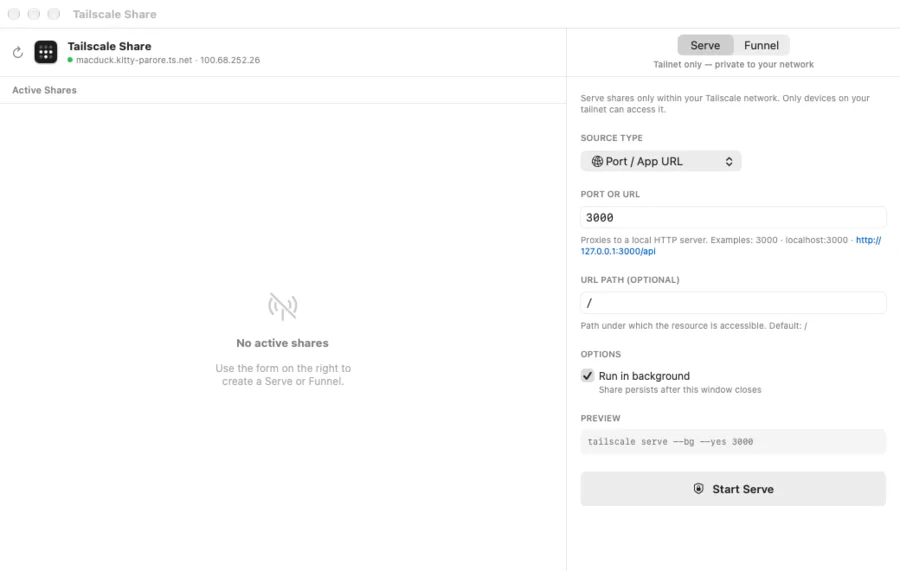
Serve and Funnel
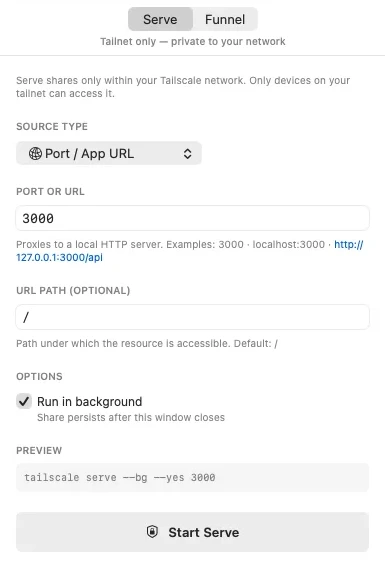
Choose between tailnet-only (Serve) and public (Funnel) in a single click. No command to remember, no flags to type.
More in Tailscale Share
-
Built-in HTTP server
Share a file or directory without running a server manually. Tailscale Share uses Network.framework to serve content directly: no Python, no Node, no node_modules.
-
One-click URLs
Every active share shows its URL in large, copyable text. Click to copy, then paste it into Slack, your browser or your colleague's terminal.
-
Persistent shares
Restart your Mac? Your shares come back automatically on app launch. The status panel shows live connection info: who is connected, bytes transferred, last activity.
Specifications
SHA-2565636fc9d76f16709e5d7084ed5155f9cfa9e6048ce9e722c5199b34db03b332b
Ready to share?
Download Tailscale Share and expose local services in seconds.
First launch tips? See the Help center →