SNMP Explorer for Mac
A native MIB browser, SNMP walker, monitor and trap receiver. SNMPv1, v2c and v3 in pure Swift, so there is nothing to install besides the app: no Homebrew, no net-snmp.
Help center →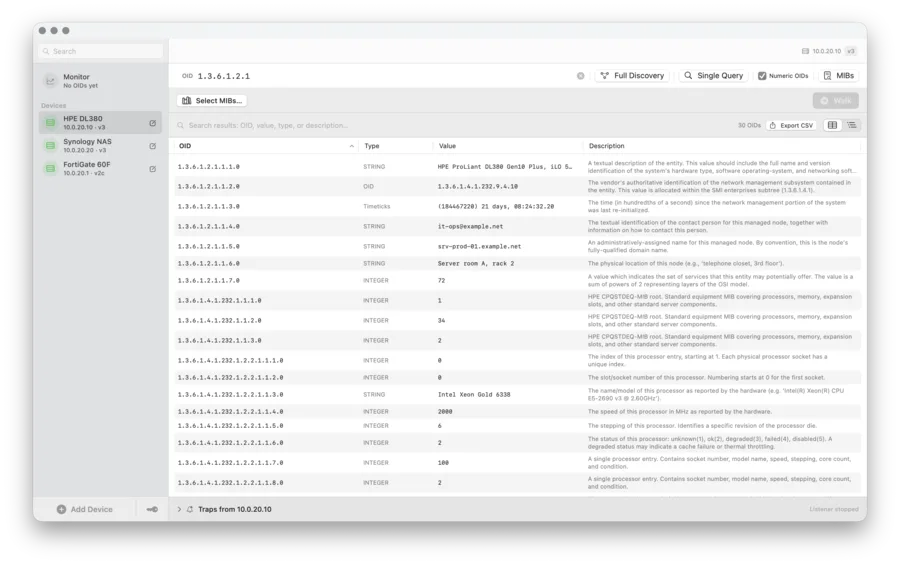
Live monitoring
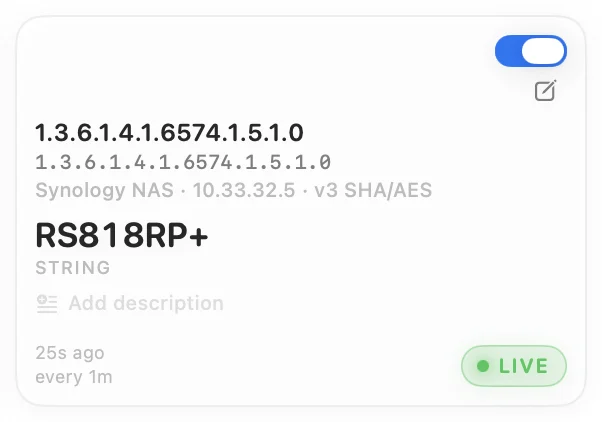
Put any OID on a card and poll it every 15 seconds, every hour, or at your own interval. Each card shows the current value, a sparkline of up to 200 samples and a Live, Stale or Error status with the reason. Polls to one device are sent one at a time, so small agents in UPS units, PDUs and RAID controllers do not drop requests.
MIB browser with vendor presets
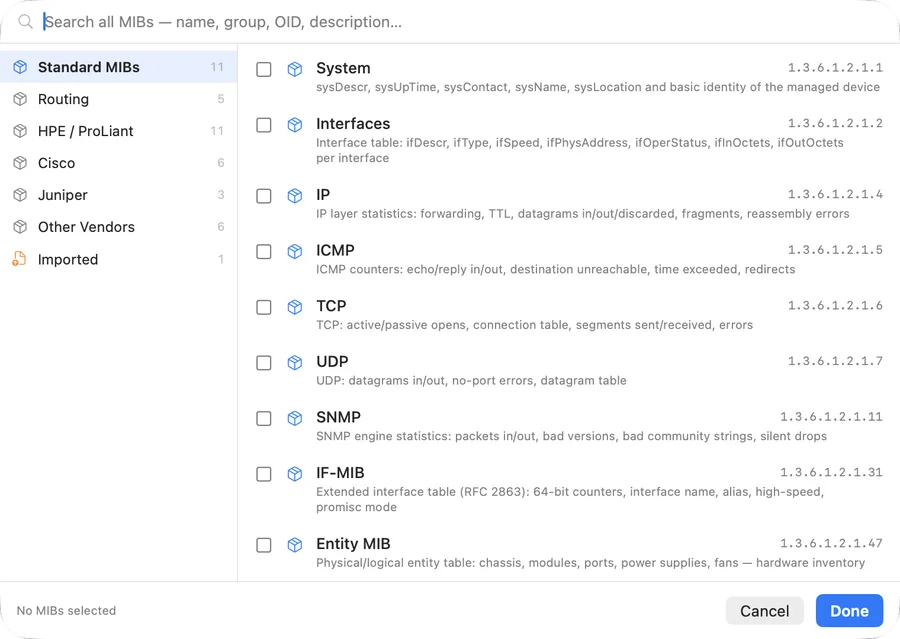
Pick from built-in groups for the standard MIBs, routing, HPE ProLiant, Cisco, Juniper and other vendors, or import your own MIB files. More than 600 built-in OID descriptions turn numbers into names before you import anything. When a MIB offers several descriptions for one OID, a short review step lets you choose.
More in SNMP Explorer
-
SNMP walk and query
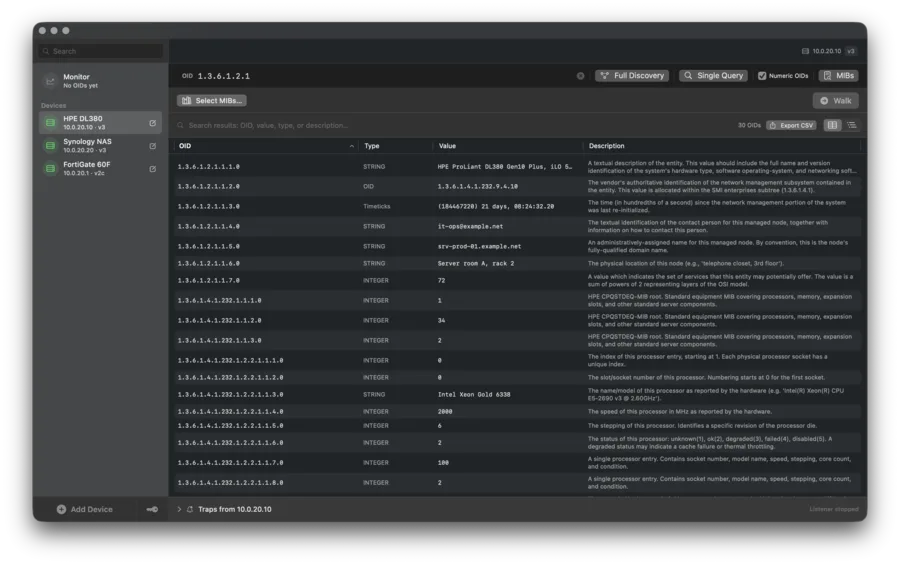
Walk a whole device with Full Discovery, or only the MIBs you pick, and watch the results stream in: the same job
snmpwalkandsnmpbulkwalkdo on the command line. SNMP Explorer uses GET-NEXT for SNMPv1 and GET-BULK for v2c and v3, and stops cleanly when an agent misbehaves. Run a single GET on any OID, switch between a flat table and a tree, filter as you type, and export the result to CSV. -
SNMP trap and inform receiver for Mac
SNMP Explorer listens for SNMPv1 and v2c traps and acknowledges informs. Traps show up in a drawer under the device they came from and in one feed across all devices, named from your MIBs where possible. The Mac App Store sandbox cannot bind port 162, so the listener uses UDP 1162 by default; you can change the port, and Preferences shows the pfctl rule that redirects 162 to it.
-
SNMPv3 security
All three security levels (noAuthNoPriv, authNoPriv and authPriv) with MD5, SHA and SHA-256 authentication and DES, AES and AES-256 privacy, set per device or once in a shared credential. A wrong password, a wrong protocol or an unknown user is reported as exactly that, not as an empty result.
-
Devices and shared credentials
Add devices one by one or import a whole list from CSV; a template is in the Devices menu. Define a community string or an SNMPv3 user once and reuse it on many devices, so a password change is a single edit. A dot in the sidebar shows within two seconds of launch whether each device answers. Everything is stored locally in the app sandbox and nothing is sent anywhere else.
Free and Pro
The free version is a complete SNMP tool for one device: Full Discovery, single queries and trap reception. Pro is an optional in-app upgrade and adds unlimited devices, the Monitor view, walking selected MIBs, MIB import, shared credentials and CSV export. Plans are listed on the Mac App Store.
Specifications
Questions
Is there an SNMP MIB browser for Mac?
Yes. SNMP Explorer is a native macOS app from the Mac App Store. It browses MIBs, walks devices, runs single queries, monitors OIDs and receives traps.
Do I need Homebrew, net-snmp or snmpwalk?
No. SNMP Explorer does the same work as the snmpwalk and snmpbulkwalk command-line tools, but the SNMP stack is written in Swift and built into the app. Nothing else has to be installed, and the app never shells out to a command-line tool.
Can a Mac receive SNMP traps?
Yes. SNMP Explorer listens on UDP 1162 by default because sandboxed apps cannot use ports below 1024. Point your devices at port 1162, or use the pfctl rule shown in Preferences to redirect port 162.
Does it support SNMPv3 with SHA-256 and AES?
Yes: noAuthNoPriv, authNoPriv and authPriv, with MD5, SHA or SHA-256 authentication and DES, AES or AES-256 privacy.
Does it run on Apple Silicon and Intel?
Both, on macOS 13 Ventura or later.
Is it free?
The download is free and fully usable with one device. Pro is an optional upgrade for more devices, monitoring, MIB import and CSV export.
Where is my data stored?
Devices, credentials, walk results and imported MIBs stay in the app sandbox on your Mac. The app has no telemetry and talks only to the devices you add.
Go deeper
Help center
Every part of the app explained, with snmpwalk in Terminal, finding OIDs, test traps, SNMPv3 errors and a Synology example.
OID reference
The 600+ OIDs the app knows out of the box, grouped by MIB and vendor.
SNMP glossary
OID, MIB, community string, USM, engine ID, traps and informs in plain words.
Changelog
What changed in every version, as published on the Mac App Store.
Press kit
Fact sheet, icon and screenshots for articles and directories.
Ready to explore your network?
On the Mac App Store. Requires macOS 13 (Ventura) or later.
Need help? Visit the Help center →